Finding your loads
A load is your job: the thing you're hauling from point A to point B. Each load holds the permit, the route, and the details in one place, so you never dig through papers. This is how to find today's work on your phone or tablet.
New to loads? See Load management for what a load is and how it fits together.
Open My Schedule
Open the app and head to your list of jobs.
- 1
Open the app
Look at the bottom of the screen. Drivers usually see three tabs: My Schedule, Scan Permits, and All Projects (you may also see an Inbox). - 2
Tap My Schedule
This tab holds your jobs, listed under a "My Loads" heading. - 3
Find your load
Loads are grouped by when you run them:
- Today - what you're running right now.
- Up Next - everything coming up, grouped by date.
- Week 2-4 - anything further out. Tap Show Next 3 Weeks to see it.
- 4
Tap the load
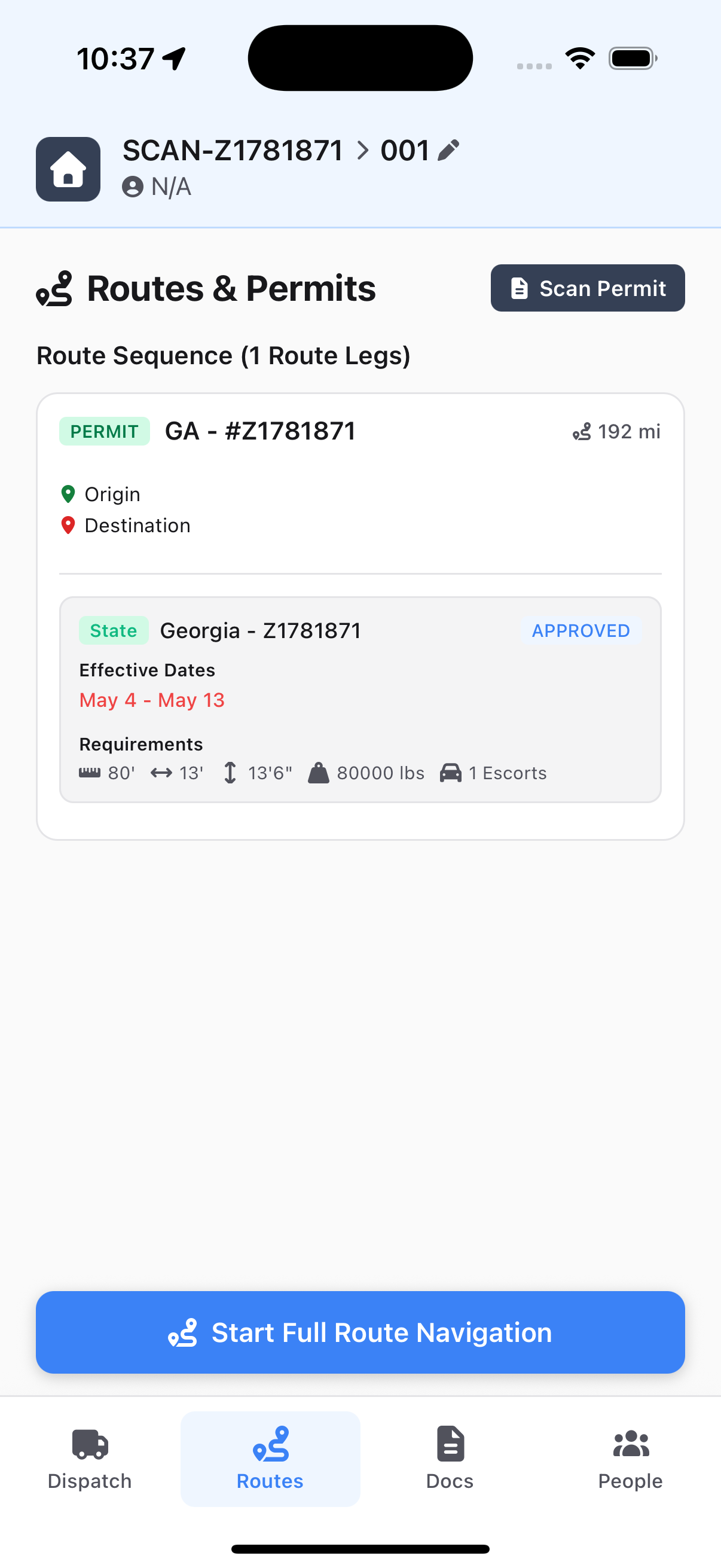
The load opens on its Dispatch tab. Tap the Routes tab to see where it's going, the permit, the route on the map, and the big Start Full Route Navigation button.
How loads get to you
Here's where they come from.
You don't create your own loads. Your dispatcher assigns them from the web app, and they show up on your phone on their own. Once you're assigned, the load appears under Today or Up Next.
What's in a load
Each load packs everything for the job into one place.
- The permit - number, state, approved dimensions, effective dates.
- The route - the roads you'll drive, shown on a map.
- A big Start Full Route Navigation button for when you're ready to roll.
If your dispatcher already scanned your permit, it's all here waiting. If you need to scan it yourself, go to Permits and your route.