🚀 Smart Curfews, Improved Mobile Nav, and Project Dispatch
Released: February 2026
Dear Offloaders,
We’re excited to share a substantial update packed with powerful new capabilities across Digital Dispatch, Offload Mobile, permit SmartScan routing improvements and curfew management, and performance improvements. This release represents significant progress in making Offload faster, more flexible, and better equipped to handle the complexities of heavy haul operations.
Many of these enhancements were developed in response to your feedback and real-world use cases. Thank you for continuing to help us build the platform you need!
Happy Hauling, Eric
🎯 Top 3 This Release
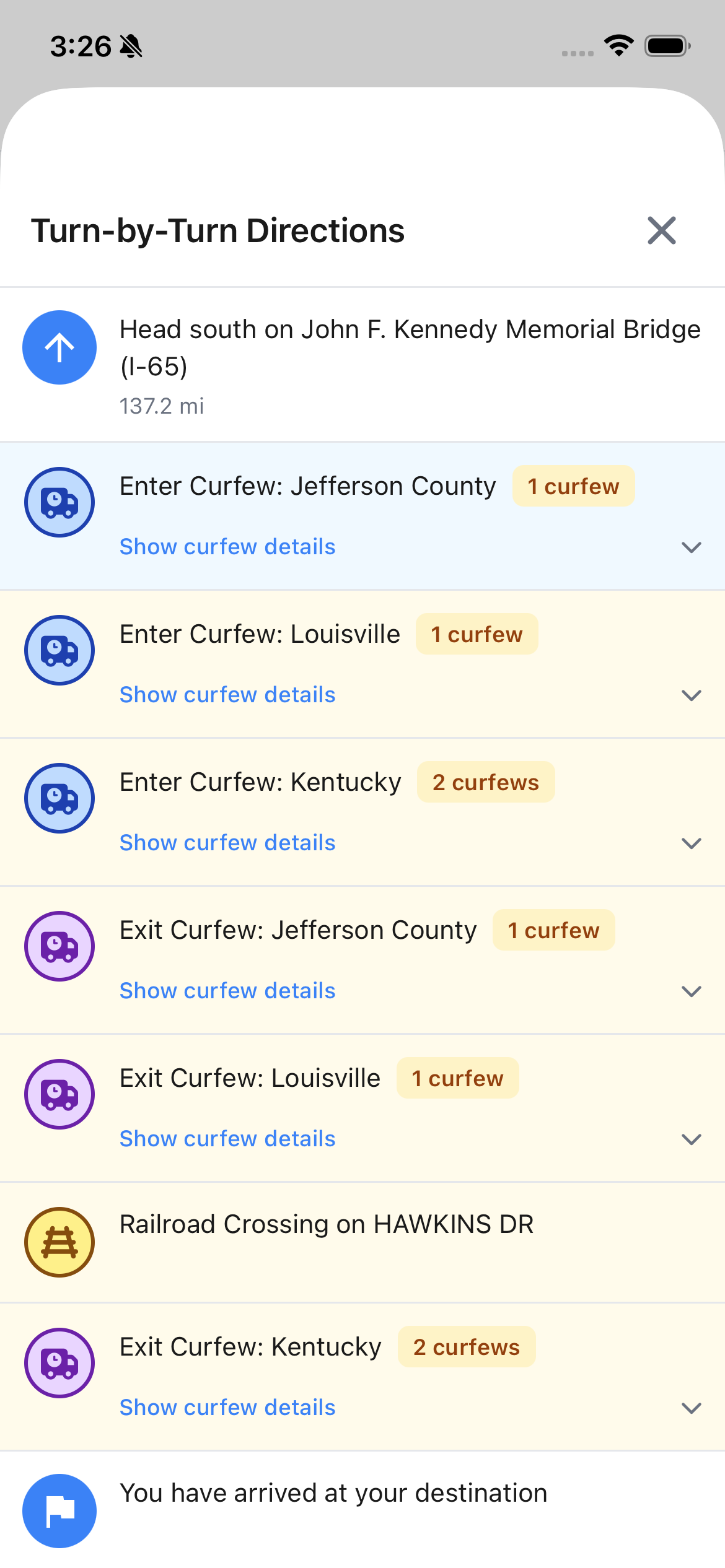
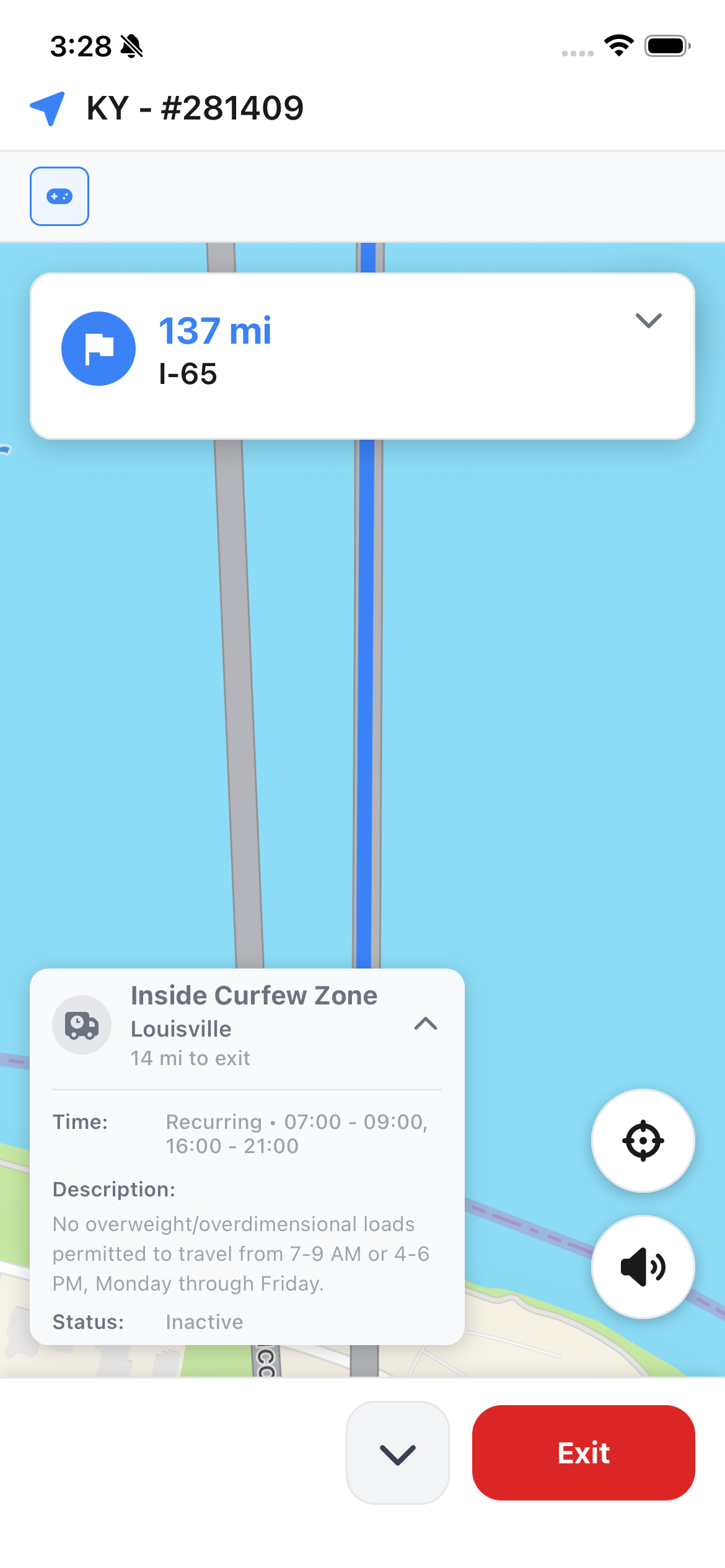
- Curfews Integrated Into Navigation - Drivers now see real-time curfew status, proximity warnings, and voice announcements during turn-by-turn navigation.
- Enhanced Mobile Navigation - Resume routes instantly, keep your screen awake during navigation, and enjoy smoother pan/zoom controls.
- Daily Project Crew & Equipment Dispatch - Manage day-by-day job-site crew and equipment requirements, schedule jobs and loads, and assign resources from a unified dispatch board.
Read on for full details ⬇️
Mobile
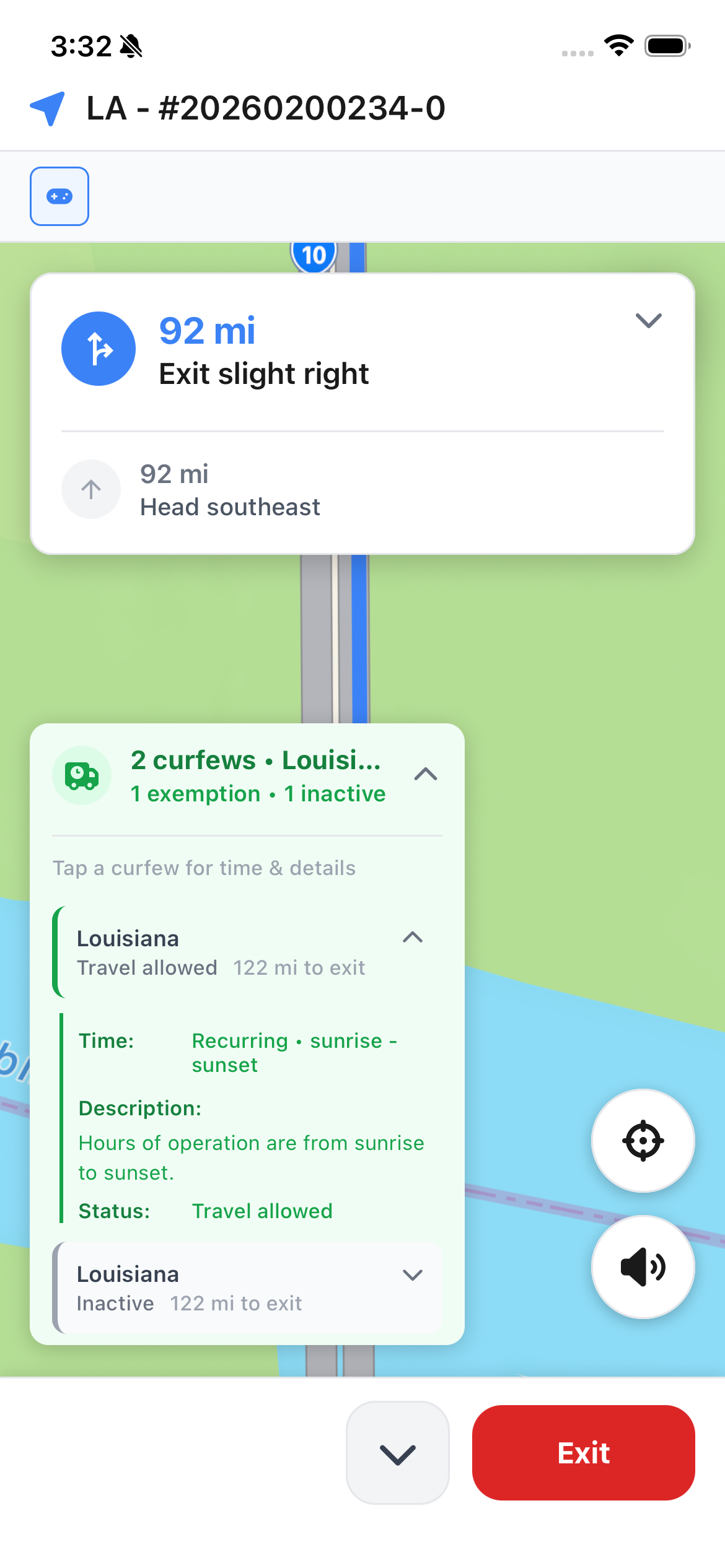
Curfews Displayed During Navigation
Drivers now have full curfew visibility integrated directly into turn-by-turn navigation.
- Curfew information displays automatically during navigation based on your current location and time.
- Proximity calculations show how close you are to entering or exiting curfew zones.
- Real-time status updates indicate whether curfews are currently active or upcoming.
- Voice announcements alert drivers to curfew restrictions along the route.
- Timeframe handling properly accounts for timezone differences across multi-state routes.
Curfews in Mobile Review Permit SmartScan
Drivers can review and edit curfew details when scanning and digitizing a permit in the field.
- Confirm and update applicable jurisdictions and time windows.
- Location information automatically calculates where curfews apply along the route.
- Route confirmation required before accessing detailed curfew data to ensure drivers review requirements first.
Navigation Quality of Life Improvements
Mobile navigation is now smoother and more reliable for drivers in the field.
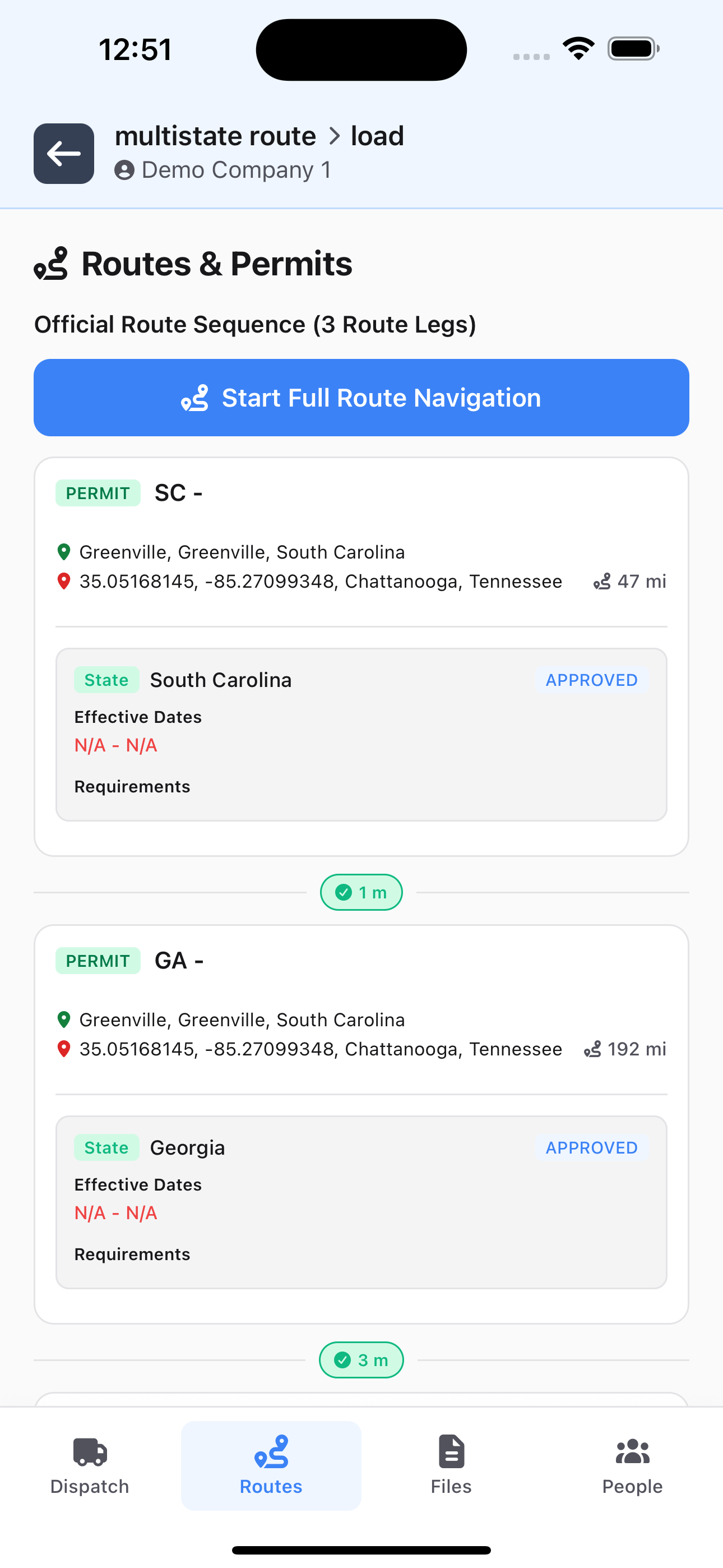
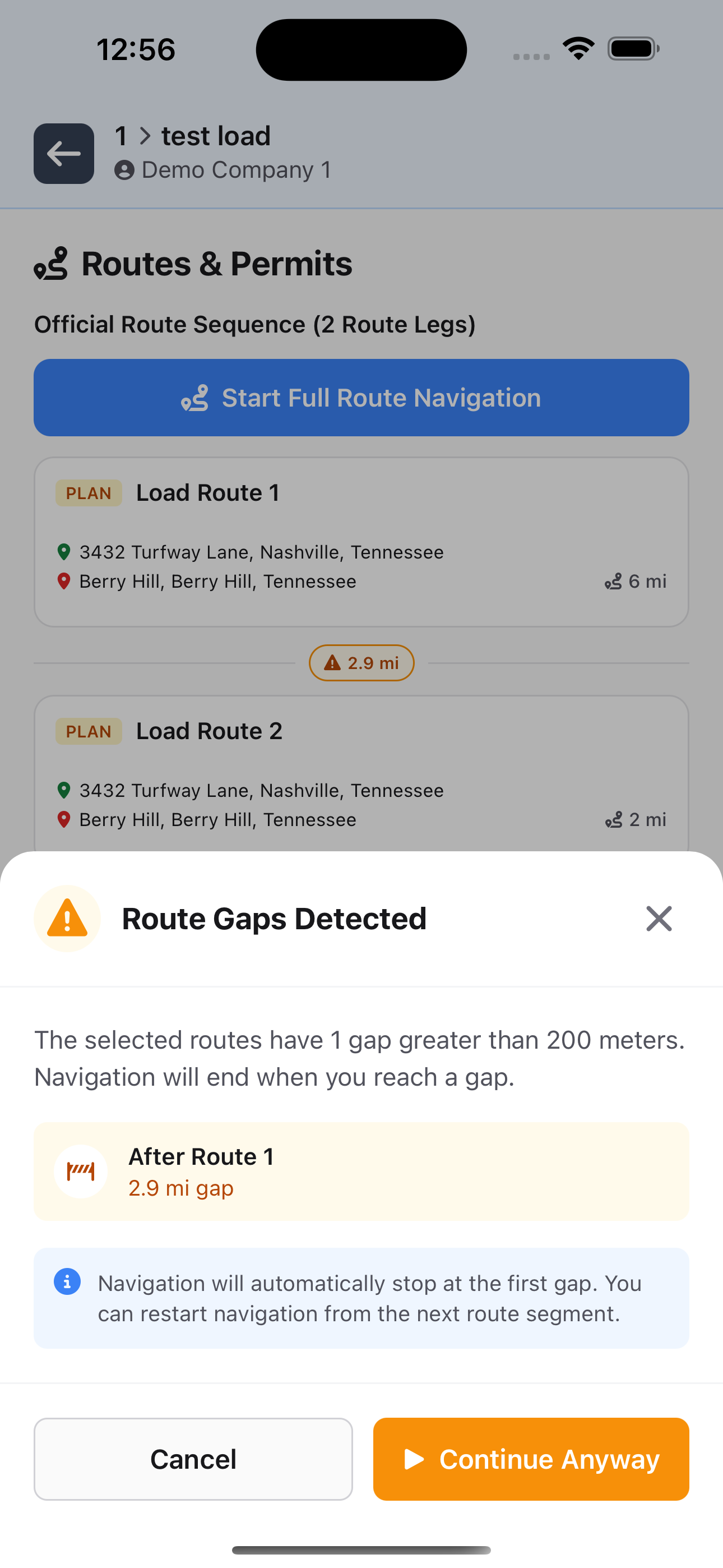
- End-to-end route navigation automatically stitches together multi-state routes.
- Screen stays awake automatically during active navigation to keep directions visible.
- Pan and zoom the map freely without it snapping back to your location.
- Numerous other bug fixes and performance enhancements in the navigation experience.
Other Mobile App Enhancements
- The home screen now presents the next 7 days of assigned loads for easy access.
Dispatch & Scheduling
BETA - Daily Project Crew & Equipment Dispatch
We’re excited to unleash a suite of features that expand Offload’s dispatch capabilities beyond transport load scheduling into full-scale project crew and equipment management.
- Project activity can now be scheduled on specific dates independently of the start/end timelines for transport loads.
- On each of a project’s scheduled dates, you can set up crew requirements, equipment requirements, and notes to organize the day’s work.
- Each crew requirement can have an assigned crew member as well as an assigned truck and personal data for that crew member.
- Multiple trucks and/or trailers (AKA “Assets”) can be assigned to the project each day to represent on-site equipment.
- If a crew member assigned on a project dispatch for the day is also assigned to drive any transport load, that information is displayed for easy coordination.
New “Load Cards” & “Crew Board” Dispatcher Views
In addition to the “Dispatch Schedule” timeline and “Daily Dispatch” report style views, you can now switch to two new dispatcher layouts that make it easier and faster than ever to manage highly complex specialized dispatch.
Load Cards presents loads with their commodities and equipment setups in a highly compact layout, grouped by project and by date. The focus is load planning and load equipment setup dispatch.
- Drag resources onto loads to assign them to specific equipment setups based on required resource types.
- Drag and drop commodities between loads to rearrange load plans on the fly.
- Drag unscheduled loads onto the board to schedule them.
- Quickly update load statuses and monitor each load’s permitting status in real-time.
- Select a date row to get dynamically calculated dispatch status for every resource based on that date’s activities.
- And much more!

Crew Board focuses on the new Daily Project Crew & Equipment dispatch workflows, but layers in transport loads in an even more streamlined and integrated view.
- Drag projects onto dates to schedule project activity for that date.
- Drag resources onto Projects to assign people as crew members and assets as on-site equipment.
- Drag crew member assignments between projects and dates for easy dispatch shuffling and adjustment.
- Drag loads around the board to rapidly reschedule and reassign them as well.
- Drag an entire project card from one date to another to instantly reschedule crew, equipment, and loads all in one simple action.
- Copy project dispatch cards and optionally include crew requirements and assignments, equipment requirements and assignments, and notes to instantly set up a multi-day project with default assumptions, but still customize each day’s requirements and assignments as needed.

Both new layouts support one-click export of an entire day’s dispatch cards in a clean, full-resolution PDF or link to a live, read-only view of only that date’s schedule and assignments.
Resource Status Management - Current and Planned
Manage current and planned availability for all people, truck, and trailer resources. Great for vacation, time off, planned maintenance, and any other scenario where you want to block resources off on the dispatch schedule.
- Add and edit planned unavailable time in the future.
- Quickly update the current status and provide a “reason” description.
- Mark personnel and assets as “terminated” as of a specific date to remove them from workflows going forward.
- All status events are respected when calculating effective dispatch status and availability for assignment.

Asset Commodities
Load commodities can now be set up as “asset” type for when you’re hauling units in your own inventory.
- For each commodity, you can now specify a required asset type by selecting from your organization’s existing asset types.
- Optionally add a description to each commodity as needed for additional instructions.
- Assign a specific truck or trailer unit for each commodity and the assignment is shown and respected across all dispatcher views.
- Commodity assets can be assigned via drag-and-drop in the new Load Cards and Crew Board dispatcher views.
- “Custom” commodities still fully supported and can easily be duplicated for repeat jobs with mostly the same setup.

Active Development - Feedback Requested! The Digital Dispatcher features above are still in development and we are actively seeking feedback from customers with complex dispatch requirements. If you have highly complex dispatch workflows that are begging to be digitized and streamlined, but you’re not sure this tool can handle them, reach out to support@letsoffload.com so we can make sure this platform will work for your specialized requirements!
Permits & Routing
Advanced Curfew Management System
Digitize location-and-time-based permit restrictions with unprecedented flexibility and control.
- Curfews are automatically extracted from permits as part of the SmartScan workflow, ready for review and confirmation after the permit routes have been confirmed.
- Each curfew can apply to multiple local jurisdictions or other geographic areas, resulting in multiple intersected stretches of the permitted route.
- Entry and exit waypoints for each jurisdiction are calculated automatically and shown along the route for visual confirmation.
- Applicable timeframes are extremely flexible to match the wide array of real-world curfew regulations.
- Toggle curfew restrictions on or off per permit route as requirements or routes change.
- Timezones are handled properly for accurate real-time evaluation of curfews during navigation with the Offload Mobile app.


Enhanced Load Jurisdiction Management
Load jurisdiction data stays accurate throughout the permit lifecycle.
- Loads service and permits service updated to maintain load-level jurisdictions.
- Automatic updates when permits are created or modified.
- Better synchronization between route data and jurisdiction information.
- Improved accuracy for compliance reporting and permit tracking.
Route Confirmation Workflow
New workflow ensures routes are properly reviewed before use.
- Lock screen when routes haven’t been confirmed yet.
- Route confirmation action validates all requirements are met.
- Status management prevents incomplete routes from being used in dispatch.
- Clear visual indicators show which routes need review.
- Routes can be confirmed even with missing waypoints when necessary for operational flexibility.
Other Fixes and Enhancements
- Fixed timezone bugs in dispatcher affecting date-based filtering.
- Fixed Permitting status on events in the Dispatch Schedule.
- Better handling of malformed routes during processing.
- Resolved full route navigation reversed geometry bug.
- Added fallback for missing locality data during geocoding operations.
- Numerous other performance improvements across all aspects of the Offload platform.
As always, we’d love to hear your feedback on these updates. Reply to this email with questions or suggestions!
Happy Hauling, Eric